
Square Root 4B
Overview
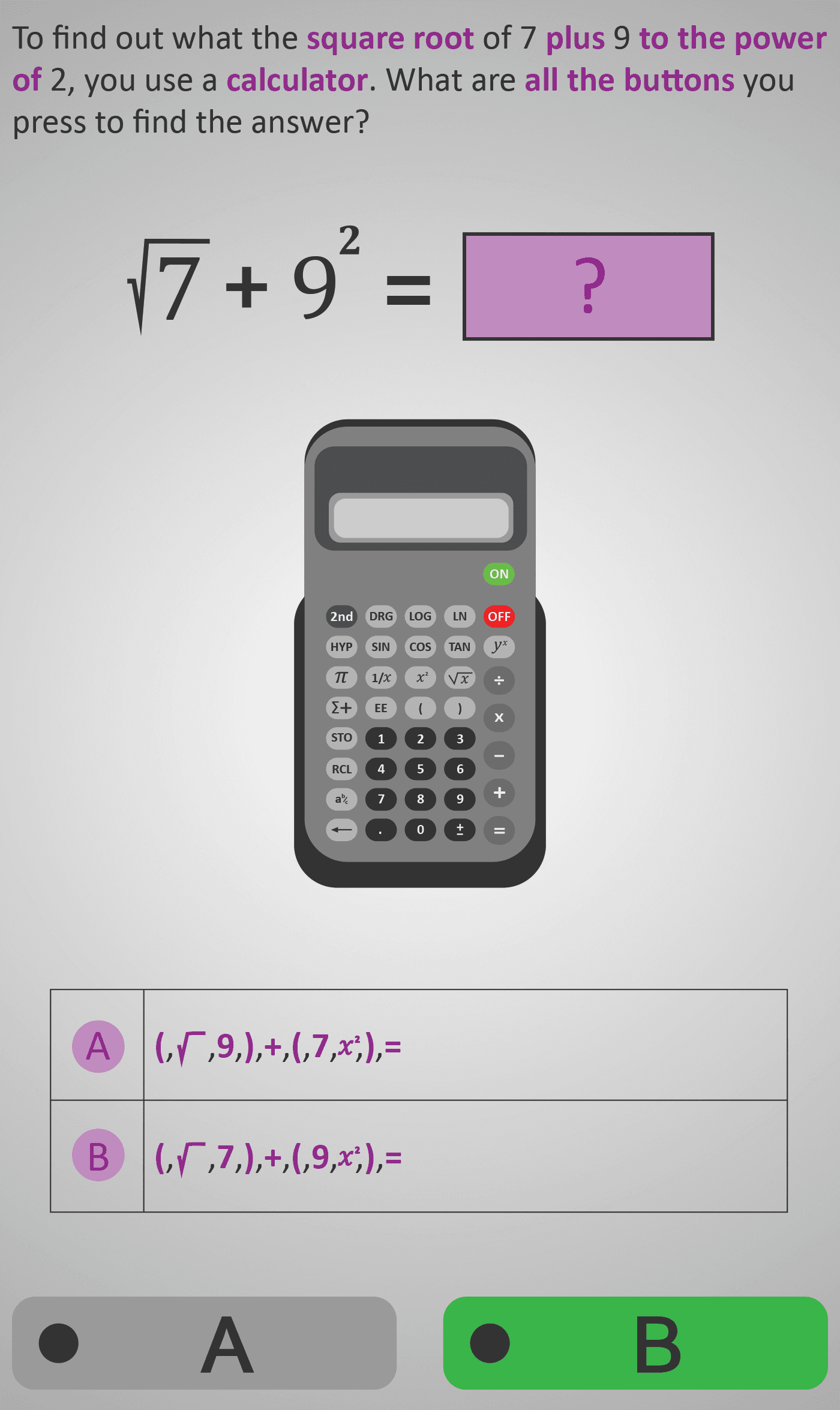
This Phlow extends calculator fluency beyond single operations to expressions that combine square roots and powers. Students are guided through the full entry of √7 + 9², learning how to respect calculator syntax and operation order.
Each step isolates a single calculator action — using the √ key, adding brackets, inputting numbers, and pressing the x² button. The process reinforces how calculators handle the order of operations and why proper grouping with brackets is essential. Learners finish by checking that their final display and result match the expected value of ≈ 83.65.
Worked Example
Expression: √7 + 9²

Step 1: √7 ≈ 2.65
Step 2: 9² = 81
Step 3: 2.65 + 81 = 83.65

Calculator entry:
√ ( 7 ) + ( 9 x² ) = 83.6457513111
Rounded result: 83.6
Step Sequence
- Press √ and enter the number 7 (square root part).
- Add + and then enter 9.
- Press x² to square the number.
- Use brackets as needed to ensure correct operation order.
- Press = to view the result and interpret its reasonableness.
Sample Prompts
- What should be calculated first — the square root or the square?
- Which keys do you press to square 9?
- Why are brackets useful in this expression?
- Which answer makes sense: 83.6 or 86.3?
Why This Matters
This skill underpins all future calculator work in algebra, geometry, and physics. Knowing how to manage combined operations develops both accuracy and confidence in interpreting mathematical expressions.
Prerequisite Knowledge Required
- Recognise and interpret the symbols √, +, and ².
- Understand that squaring and square roots are inverse operations.
- Know how to use the x² and √ keys on a calculator.
- Be familiar with brackets and the order of operations (BODMAS/PEMDAS).
Linked Phlows:
Square Root 4A – Finding a Square Root,
Squares 3B – Squaring Numbers,
Calculator Skills 3A – Using Functions.
Main Category
Number & Arithmetic
Estimated Completion Time
Approx. 10–14 seconds per question.
40 questions total → Total time: 7–10 minutes.
Cognitive Load / Step Size
Moderate. The addition of both a root and a power increases complexity, but button-by-button sequencing manages cognitive demand effectively. The task remains approachable through clear visual pacing.
Language & Literacy Demand
Low to moderate. Although the phrasing “to the power of 2” introduces new vocabulary, all symbols and buttons are supported by visuals. Learners can follow without heavy text reliance.
Clarity & Design
- Each calculator display matches what students see in real use.
- Brackets and operation symbols are colour-coded for clarity.
- Purple highlighting marks each active key press.
- Minimal text ensures focus on procedural accuracy.
Curriculum Alignment (ROI Junior Cycle Mathematics)
- Strand: Number
- Learning Outcome: Use a calculator to perform multi-step calculations involving powers, roots, and combined operations, interpreting results appropriately.
Engagement & Motivation
The realistic calculator walkthrough feels interactive and practical. Students enjoy mastering the correct sequence, and comparing two near-correct answers fosters active reflection.
Error Opportunities & Misconceptions
- Forgetting brackets, leading to incorrect order of operations.
- Pressing x² before entering the number.
- Mixing up √ and x² (inverse misunderstanding).
- Assuming the calculator auto-groups operations.
Transferability / Real-World Anchoring
Strong. This skill connects directly to real applications such as calculating magnitudes, distances, and energy formulas. It lays groundwork for algebraic and geometric reasoning.
Conceptual vs Procedural Balance
Procedural emphasis with conceptual reinforcement. Students practise accurate input while reasoning about operation order and why certain results make sense.
Learning Objectives Addressed
- Enter and compute square root and power operations accurately.
- Apply brackets correctly to group expressions.
- Understand and apply order of operations in calculations.
- Check and interpret results for reasonableness.
What Your Score Says About You
- Less than 20: You may be missing bracket use or key order — slow down and check syntax.
- 21–29: You can perform most steps but occasionally misapply a function or skip a key.
- 31–39: You demonstrate strong procedural fluency and accurate reasoning.
- 40 / 40: Excellent mastery — precise, accurate, and ready for algebraic or trigonometric expressions.